
Tip: For the latest diocesan mobile phone tariff please visit:
Disable or enable the mobile data usage warning or limit
- On your Google Pixel mobile, open the ⚙️Settings app
- Select Network and Internet
- Select SIMs
- Select the diocesan SIM card
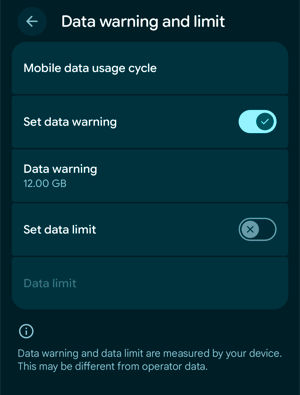
- Select Data warning and limit (visit our tariff page for your diocesan data details):
- Mobile data usage cycle is when your data renews every month
- Set data warning enables or disables the warning
- Data warning is the amount of data (GB or MB) you can set to receive a warning
- Set data limit enables or disables a limit
- Data limit is the amount of data (GB or MB) you can set to block mobile data from this SIM card once the limit has been reached